
In today’s digital age, computer security is crucial. Protecting data and privacy is essential.
With cyber threats on the rise, securing your computer should be a top priority. Hackers and viruses can steal sensitive information, leading to serious consequences. Simple steps can significantly enhance your computer’s security. Understanding basic security measures helps prevent potential risks.
This blog post will guide you through practical advice to safeguard your system. Whether you’re a beginner or tech-savvy, these tips are easy to follow. Stay safe online by implementing effective security practices. Let’s explore how to protect your computer from various threats.
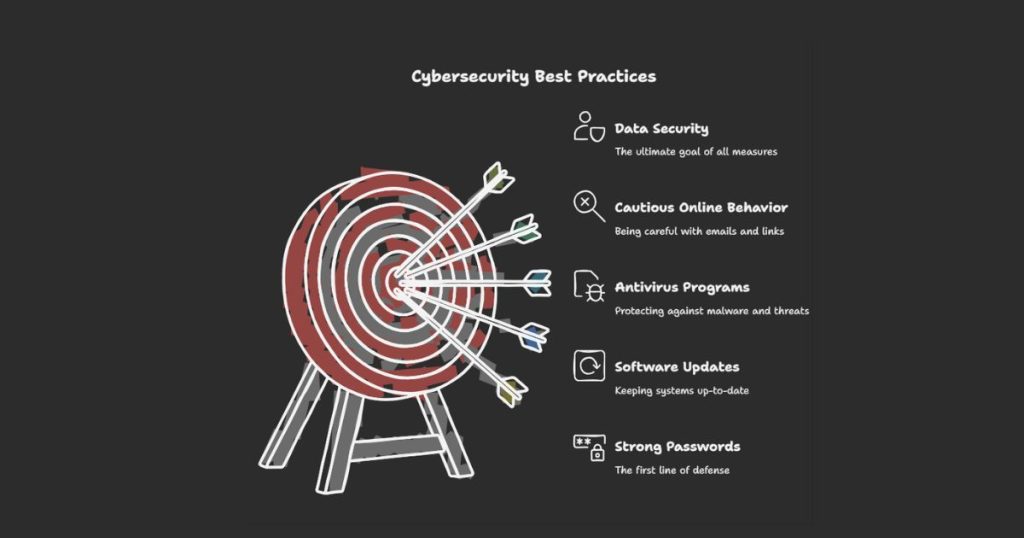
Importance Of Computer Security
In today’s digital age, computer security is more important than ever. Every day, countless threats aim to steal your personal information. From viruses to hackers, the risks are numerous. Understanding the importance of computer security can help protect your data and privacy.
Risks Of Poor Security
Poor computer security can lead to severe consequences. Hackers can steal sensitive information. This includes bank details, personal emails, and passwords. Identity theft is a common result. Malware can damage your files and make your computer slow. Ransomware can lock your files and demand money for access. These threats are real and can affect anyone.
Benefits Of Strong Security
Strong computer security offers many benefits. It protects your personal information from hackers. It keeps your data safe from malware and viruses. Good security practices can prevent identity theft. Your computer will run smoothly without unwanted programs. You will have peace of mind knowing your information is safe.
Using Strong Passwords
In today’s digital age, using strong passwords is not just a recommendation—it’s a necessity. Weak passwords are the easiest way for hackers to gain access to your personal information. This section will guide you through creating and managing strong passwords to ensure your online security.
Creating Complex Passwords
Strong passwords are your first line of defense against cyber threats. Aim for at least 12 characters. Mix upper and lower case letters, numbers, and special symbols.
Avoid using obvious choices like “password123” or your birthdate. These are the first combinations hackers will try. Instead, create a phrase or sentence that means something to you but is difficult for others to guess.
For instance, “MyD0gL0vesT0ys!” is much stronger than “ilovedogs”. The randomness and variety make it tougher to crack.
Managing Passwords Securely
Remembering complex passwords for all your accounts can be challenging. Consider using a password manager. These tools store your passwords securely and help you generate new, strong ones.
Never write your passwords on paper or save them in plain text files. These methods are not secure. If you lose the paper or someone accesses your device, your accounts are at risk.
Change your passwords regularly. Set reminders to update them every few months. If a site you use gets hacked, and you haven’t changed your password in a while, your information could be vulnerable.
Do you reuse passwords across multiple sites? It’s a risky habit. If one site is compromised, all your accounts using that password could be at risk. Make each password unique to reduce this risk.
By following these tips, you can significantly enhance your online security. Taking the time to create strong passwords and manage them wisely is an investment in your digital safety.
Enabling Two-factor Authentication
In today’s digital age, securing your accounts is vital. One effective way is by enabling Two-Factor Authentication (2FA). This method adds an extra layer of protection, making it harder for hackers to gain access. Let’s dive into how it works and how to set it up.
How Two-factor Authentication Works
Two-Factor Authentication works by requiring two forms of identification. First, you enter your password. Second, you provide a verification code. This code is often sent to your phone or generated by an app. Without both pieces, access is denied. This makes it more secure than just a password.
Setting Up Two-factor Authentication
Setting up 2FA is simple. First, go to your account settings. Look for the security section. Find the option for Two-Factor Authentication. Follow the prompts to enable it. You might need to download an authentication app. Some popular ones are Google Authenticator and Authy. Link the app to your account by scanning a QR code. Enter the code generated by the app to verify.
Keep backup codes in a safe place. These codes help if you lose access to your phone. Remember to update your phone number if it changes. This ensures you can always receive verification codes. Enabling 2FA greatly improves your account security.
Regular Software Updates
Regular software updates are crucial for computer security. Updates fix vulnerabilities, protecting against malware and cyber attacks. Keep your software up-to-date for enhanced security.
Regular software updates are crucial to maintaining your computer’s security. They ensure your system is protected against new threats and vulnerabilities. Many users neglect these updates, thinking they’re unnecessary or inconvenient, but the reality is quite the opposite.
Why Updates Matter
Updating your software regularly patches security holes that hackers exploit. These updates fix bugs and enhance performance.
Imagine leaving your front door unlocked; that’s what not updating your software does. It exposes your system to potential attacks.
Updated software often includes new features that improve your overall experience. Don’t miss out on these enhancements.
Automating Updates
Automating updates is a simple way to ensure your system stays secure.
You can set your computer to update software automatically, reducing the chance of forgetting. This saves time and effort while keeping your system protected.
Most operating systems and applications offer automatic update options. Check your settings and enable this feature to stay protected effortlessly.
Have you ever delayed an update because you were too busy? Automating updates eliminates this issue. Your computer will take care of it for you, so you can focus on other tasks.
By automating updates, you also ensure that critical security patches are applied as soon as they’re available. This reduces the window of vulnerability.
Are you confident your software is up-to-date? Take a moment to check your settings and enable automatic updates if you haven’t already.
Regular software updates are an essential aspect of computer security. They protect your system from threats and improve performance. By automating updates, you can ensure your computer remains secure with minimal effort.
Installing Antivirus Software
Installing antivirus software is crucial for your computer’s security. It helps protect against viruses, malware, and other online threats. A good antivirus can block malicious software before it infects your system. It also scans your files for any signs of trouble. Let’s explore how to choose the right antivirus and keep it updated.
Choosing The Right Antivirus
Many antivirus options are available. Some are free, while others require a subscription. Free versions offer basic protection. Paid versions provide advanced features. These include real-time scanning and ransomware protection.
Before choosing an antivirus, check its reviews. Look for high detection rates and low impact on system performance. Ensure it offers regular updates. This keeps your protection current. Consider your needs and budget. Choose the antivirus that best fits them.
Keeping Antivirus Updated
Updating your antivirus is essential. New threats emerge daily. Updates provide the latest protection. Enable automatic updates if possible. This ensures your antivirus stays current without manual input.
Regular updates also improve performance. They fix bugs and enhance detection capabilities. Check for updates regularly if automatic updates are not available. Keeping your antivirus updated is a small step. But it makes a big difference in your computer’s security.
Safe Browsing Practices
Browsing the internet is something we all do daily, but how often do you think about your safety while doing it? Practicing safe browsing habits can protect your personal information and keep your computer free from malware. Let’s dive into some crucial tips that can help you stay safe online.
Recognizing Phishing Scams
Phishing scams are one of the most common online threats. They usually come in the form of emails or messages that seem to be from a trusted source, like your bank or a popular website.
Always double-check the sender’s email address. Scammers often use addresses that look legitimate at first glance, but have subtle differences.
Hover over links before you click on them. Check if the URL matches the supposed sender’s official website. If it looks suspicious, don’t click.
Never provide personal information through email. Legitimate companies will not ask for sensitive information this way. If in doubt, contact the company directly using a trusted phone number or website.
Avoiding Malicious Websites
Malicious websites can infect your computer with malware or trick you into providing personal information. Avoiding these sites is crucial for safe browsing.
Stick to well-known websites. If you are visiting a new site, look for signs of security like HTTPS in the URL and a padlock icon.
Be cautious of pop-ups. Many malicious websites use pop-ups to trick users into clicking on harmful links or downloading malware. Use a browser with a built-in pop-up blocker.
Install a reputable security extension or software. These tools can warn you if you are about to visit a risky site and help keep your browsing experience safe.
By following these safe browsing practices, you can greatly reduce your risk of falling victim to online threats. What steps will you take today to improve your online safety?
Backing Up Your Data
Backing up your data is a crucial part of computer security. Imagine losing all your important files, photos, or work documents in an instant. It’s a nightmare scenario, but one you can easily avoid by taking a few simple steps.
Types Of Backups
There are several types of backups you can use. Each has its own advantages and fits different needs. Understanding them will help you choose the best one for you.
Full Backup: This is the most comprehensive type. It copies all your data. It takes the longest time but is the most secure.
Incremental Backup: This method only backs up data that has changed since the last backup. It’s faster and requires less storage.
Differential Backup: This backup copies all changes made since the last full backup. It’s a middle ground between full and incremental backups.
Scheduling Regular Backups
Regular backups are essential for protecting your data. It’s like setting a regular dentist appointment to avoid major issues later.
Set a schedule that fits your usage. If you work with important files every day, daily backups are ideal. For less frequent users, weekly or even monthly backups might be enough.
Use software that automates this process. Many programs allow you to set a backup schedule and forget about it. This way, you won’t miss a backup if you get busy or forget.
Think about the last time you lost a file. How much easier would life have been if you had a backup? Make it a habit to schedule regular backups. Your future self will thank you.
Securing Your Network
Securing your network is crucial for protecting your personal information. Cyber threats are growing. A secure network can safeguard your data from hackers. Here are some essential tips to help you secure your network.
Using A Strong Wi-fi Password
First, use a strong Wi-Fi password. Avoid simple passwords like “123456” or “password.” These are easy for hackers to guess. Create a complex password with at least 12 characters. Mix letters, numbers, and symbols. This makes it harder for hackers to break in. Change your password regularly to enhance security.
Enabling Network Encryption
Next, enable network encryption. Encryption scrambles your data. It makes it unreadable to anyone without the correct key. Use WPA3 encryption if your router supports it. If not, WPA2 is also secure. Check your router settings to turn on encryption. This step adds a strong layer of protection to your network.
Educating Yourself And Others
Computer security is vital in today’s digital world. Educating yourself and others can prevent cyber threats. Understanding basic security measures is the first step. Sharing this knowledge with family and employees ensures everyone stays safe online.
Staying Informed
Staying informed about cyber threats is crucial. Subscribe to security newsletters. Follow trusted websites and blogs. Read articles on the latest threats and defenses. This keeps you updated on new risks and solutions.
Attend webinars and workshops. These events offer expert insights. They also provide practical tips for enhancing security. Join online forums and groups. Interacting with others in these communities can enhance your knowledge.
Training Family And Employees
Train your family and employees on security practices. Start with basic concepts. Explain the importance of strong passwords. Teach them how to identify phishing emails. Show them how to use antivirus software.
Organize regular training sessions. Use simple language and clear examples. Create a culture of security awareness. Encourage questions and discussions. This makes learning interactive and effective.
Provide written guides and resources. Easy-to-follow instructions help reinforce learning. Ensure everyone knows the steps to take in case of a security breach. Preparedness can minimize damage and restore safety quickly.
Frequently Asked Questions
What Is The Best Advice For Cyber Security?
Use strong passwords, update software regularly, enable two-factor authentication, and avoid suspicious links and emails.
What Are The 5 C’s In Security?
The 5 C’s in security are Confidentiality, Integrity, Availability, Consistency, and Control. They ensure data protection, accuracy, and accessibility.
What Is The Best Way To Secure Your Computer?
Use strong passwords, enable two-factor authentication, install antivirus software, update regularly, avoid suspicious links, and back up data.
What Are The 3 C’s In Security?
The 3 C’s in security are Confidentiality, Integrity, and Availability. Confidentiality ensures data privacy. Integrity maintains data accuracy. Availability guarantees reliable access to information.
Conclusion
Good computer security protects your data and privacy. Follow the advice shared here. Use strong passwords and update software regularly. Avoid suspicious emails and links. These steps help keep your information safe. Stay informed about new threats. Protect your devices and personal information.
Simple actions can prevent many issues. Stay safe online and practice good security habits daily.